Skip to content

The visual editor for SFC and GRAFCET sequences.

AutomationView is a professional sequence editor for industrial PLC automation. Design sequences visually and simulate them without hardware. Every sequence becomes plain Python, readable by engineers, developers, and AI.

Save time. Reduce bugs. Be more productive.

No credit card required · Early access, now open to automation engineers.

Cross-platform

One editor. Every desktop.

AutomationView runs natively on Windows, macOS and Linux. Install it on the machine you already work on, and your projects and license follow you everywhere.

Windows

Windows 10 & 11 (x64)

macOS

Apple Silicon & Intel

Linux

deb & tar.gz (x64)

One subscription for every platform, with no extra license per machine.

How It Works

From visual design to validated logic in three simple steps

1

Design

Build your sequence diagram in the graphical editor, with smart completion for conditions and actions

2

Transcribe

Every sequence is transcribed into clean Python that humans, developers, and AI can read.

3

Simulate

Test your automation logic in real-time simulation without a physical PLC

What you can do

Everything an automation project needs, in one editor

From the first sketch to validated logic, version history and handover documentation: here is what AutomationView lets you do.

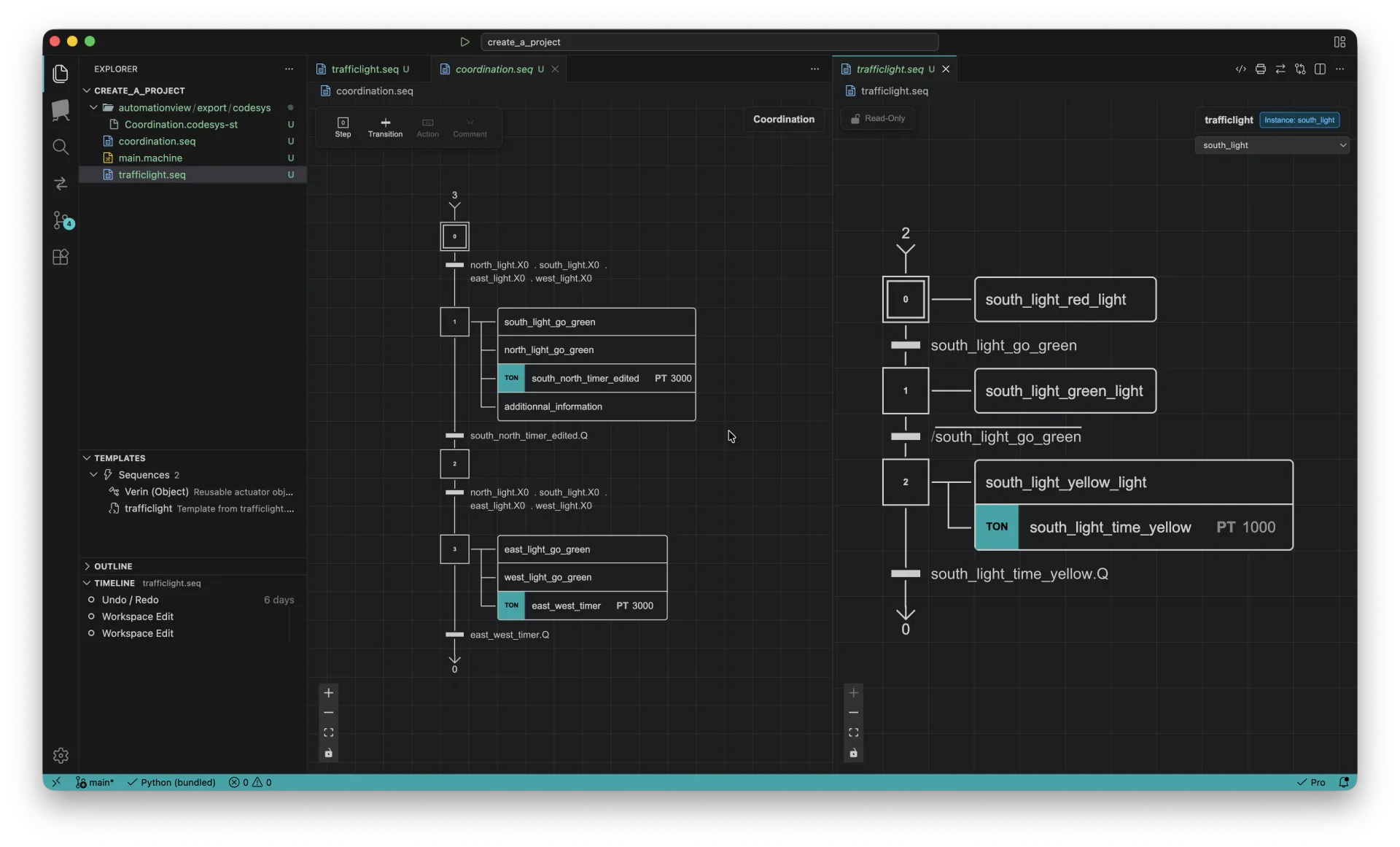
automationview - full editor
Your whole automation workflow in a single, modern editor

Your whole automation workflow in a single, modern editor

01 Visual editor

Design sequences visually, not in raw code

Draw steps, transitions and actions on a clean canvas built on SFC (IEC 61131-3) and GRAFCET (NF EN 60848). Smart auto-layout keeps every diagram tidy as you build.

  • Add steps, transitions and actions from a floating toolbar
  • Auto-layout aligns your diagram automatically, no manual dragging
  • Type-aware completion knows every variable, timer and step
Learn more
coordination.seq
AutomationView visual SFC / GRAFCET sequence editor with auto-layout
02 Simulation

Validate your logic before touching hardware

Run your sequence step by step right in the editor. Watch transitions turn true, steps activate and timers count down live, and catch sequencing errors early.

  • Step-by-step execution with live step and transition states
  • Built-in timers animate with progress bars as they run
  • No PLC required, test the moment you finish drawing
Learn more
trafficlight.seq - simulation
AutomationView running a sequence in step-by-step simulation mode
03 Multi-platform export

Turn your design into vendor PLC code

Generate ready-to-deploy code from your visual sequence automatically. Export to CODESYS V3 Structured Text and other formats without manual recoding.

  • One-click CODESYS V3 Structured Text generation
  • IEC 61131-3 transition logic written for you
  • Your design and exported code stay in sync
Learn more
Coordination.codesys-st
AutomationView generating CODESYS Structured Text from a visual sequence
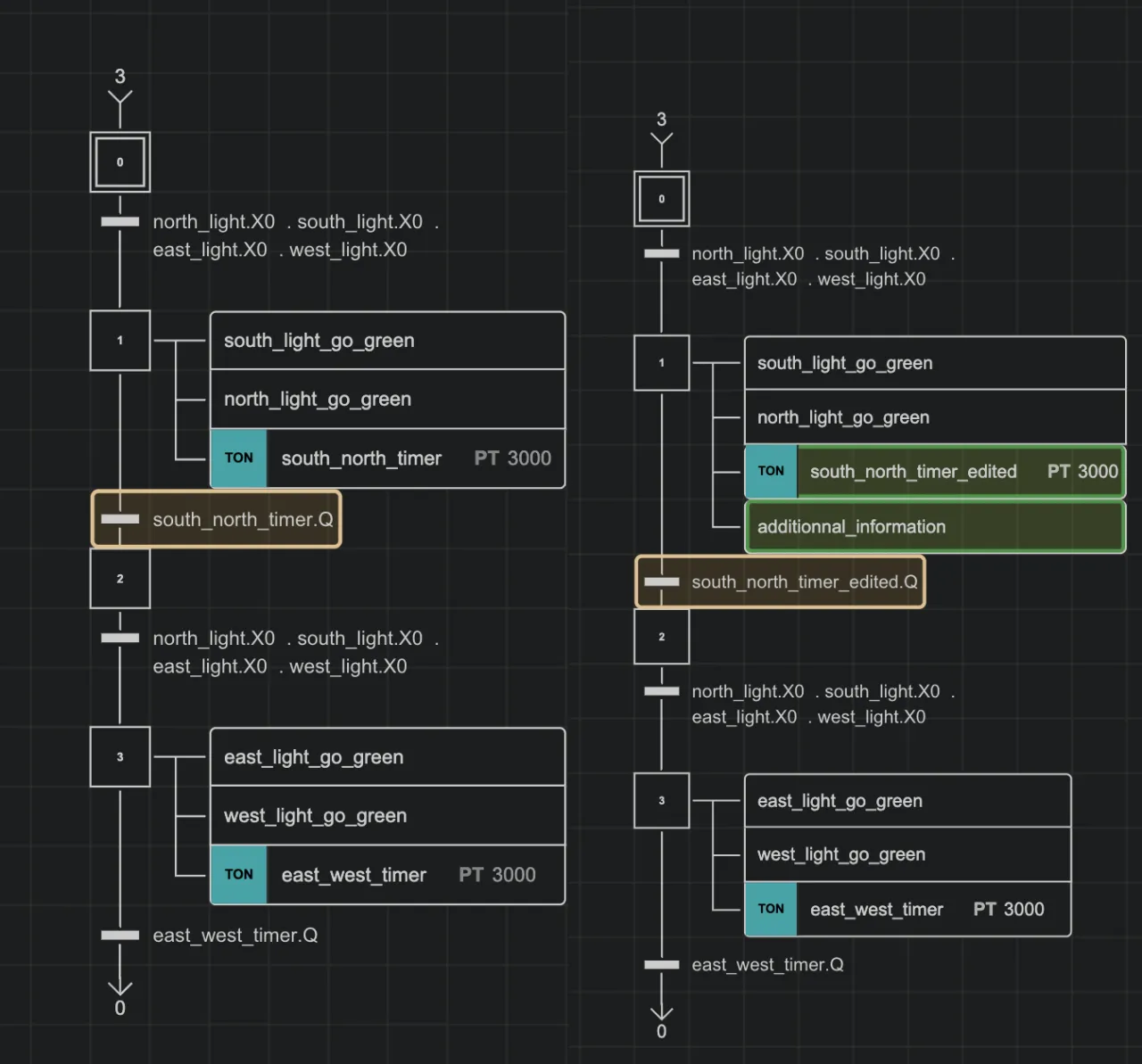
04 Version control

See exactly what changed, on the diagram

Commit, branch and roll back your sequence and machine files with native Git, then review changes visually, highlighted directly on the GRAFCET diagram.

  • Built-in Git for sequence, machine and generated code
  • Visual diff highlights added steps, timers and transitions
  • Full project history with confident rollback
Learn more
source control - diff
AutomationView visual diff highlighting changes on a sequence diagram
05 Standardization

Standardize once, reuse on every machine

Save your best sequences and actuator objects as reusable templates, then drop them into any project so every machine follows the same proven standard.

  • Reusable actuator and sequence template library
  • Enforce your team's engineering standards everywhere
  • Structured project hub for metadata and instances
Learn more
templates
AutomationView reusable sequence and object template library
06 Documentation

Generate handover documents in one click

Turn any sequence into clean, A4-ready PDF or PNG documentation for handover, audits and machine binders, generated straight from your live diagram.

  • A4 portrait or landscape, ready to print
  • One-click PDF and PNG export
  • Always reflects your latest logic, no redrawing
Learn more
print preview - A4
AutomationView print preview producing A4 PDF documentation of a sequence

Core capabilities

One workspace for visual design, simulation, version control and Python transcription of your sequences.

Project Management

Organize and manage your automation projects with a structured workspace. Track progress, manage files, and keep your team aligned.

Fast Development

A fast, intuitive editor with smart completion that suggests conditions and actions from your variables. Sequences become Python, so developers and AI can generate and edit automation logic programmatically.

Team Collaboration

Work together through built-in Git: branches, change tracking, and full version history keep your whole team in sync.

Real-Time Emulation

Test your logic instantly with scan-cycle emulation. Validate your programs in real-time without a physical PLC.

Intuitive Interface

A focused workspace with keyboard-driven sequence editing and none of the vendor-tool clutter.

AI Integration

Run Claude Code or any terminal-based AI assistant inside the editor to generate and refactor sequence logic.

On the Roadmap

AutomationView evolves with your needs. Here is what is coming next.

Multi-Platform Compatibility

Growing compatibility with the formats used by Siemens, Schneider, Rockwell, CODESYS, and more.

Language Conversion

Convert your sequences to Ladder, Structured Text, and FBD languages with a single click.

Real PLC Connection

Connect directly to physical PLCs for live monitoring, testing, and deployment of your automation programs.

OCR Handwritten Sequences

Write your GRAFCET or SFC on paper, scan it, and let AutomationView convert it to a digital sequence automatically.

Pre-Release

Join the pre-release

Try AutomationView before everyone else and help shape its development.

Free early access

Use all features before the public launch.

Simulate without hardware

Test your sequences in real time, directly from the editor.

Shape the product

Your field feedback directly influences the next versions.

Fill out the form

3 minutes, free access

See AutomationView in Action

A short walkthrough of visual sequence design, smart completion and Python transcription.

AutomationView

Ready to get started?

Create a free account and start your trial. No credit card required.